Markdown Style Showcase
所有 Markdown 扩展语法的实时渲染效果展示
# Markdown Style Showcase
This page demonstrates all Markdown syntax supported by GEO Wiki Pro and its rendering effects. Each syntax comes with source code for easy reference.
---
## GEO Wiki Pro Interface Preview
Below is a screenshot of the GEO Wiki Pro interface:
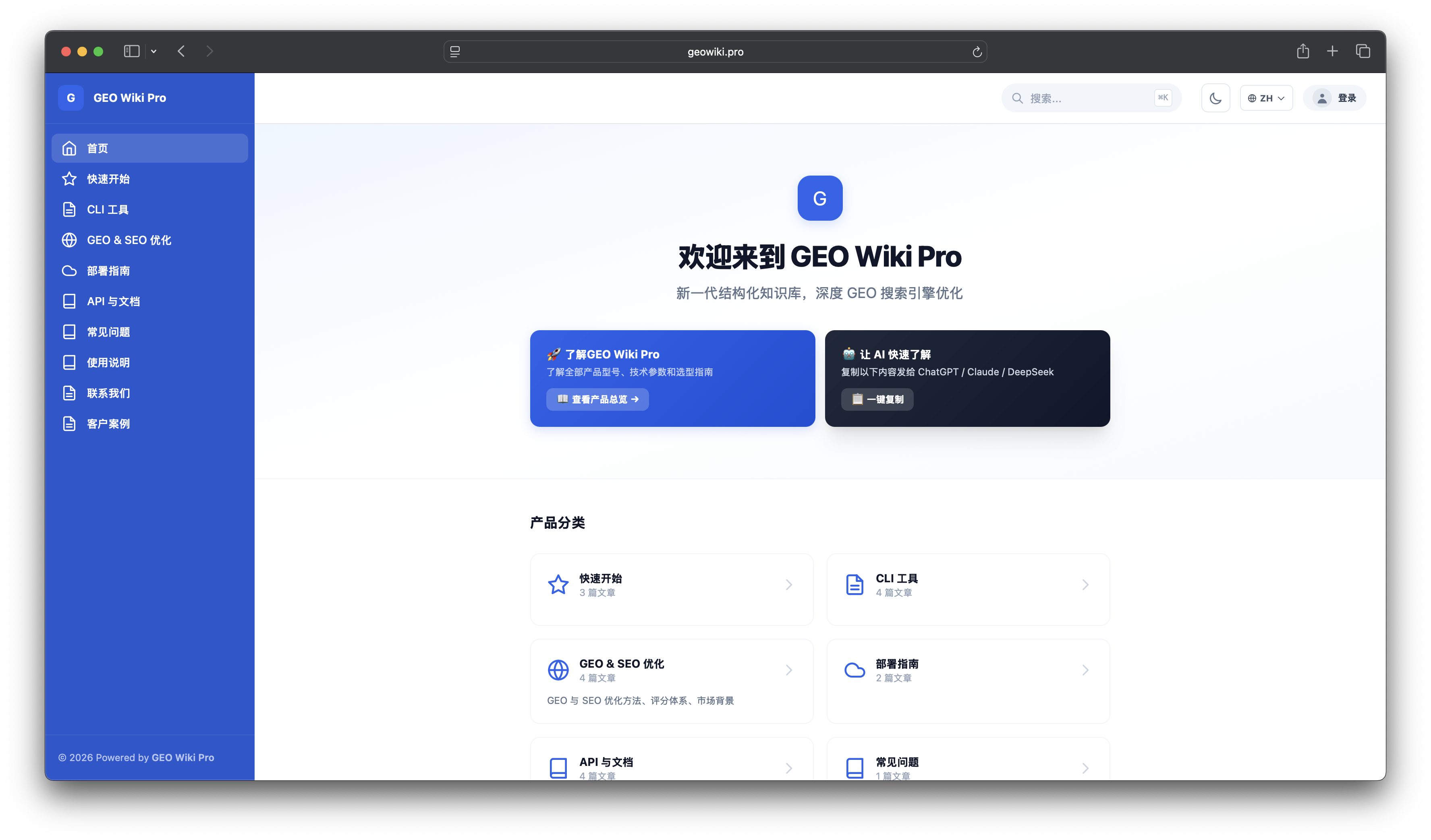
**Interface Highlights:**
- Modern UI design with dark mode support
- Left sidebar category navigation for quick switching
- Global search with instant results
- Chinese / English / Japanese language switching
- AI-friendly with one-click llms.txt copy
---
## 1. Callouts
::: note
**Blue Callout** — Supplementary information to help readers understand the context.
:::
::: tip
**Green Callout** — Useful tips and best practices.
:::
::: warning
**Yellow Callout** — Important notes, please read carefully.
:::
::: danger
**Red Callout** — Critical safety information. Ignoring it may lead to serious consequences.
:::
---
## 2. Code Blocks
### Basic Code Blocks
```bash
# Install GEO Wiki CLI
npm install -g geowiki-cli
# Login
geo login --url https://geowiki.pro --token geo_xxxxx
# List documents
geo doc list --lang en --json
```
```javascript
// Vue 3 Composition API
import { ref, computed } from "vue";
const count = ref(0);
const doubled = computed(() => count.value * 2);
```
```python
# Python example
import requests
response = requests.get("https://geowiki.pro/api/v1/docs")
docs = response.json()["data"]
for doc in docs:
print(f"{doc['slug']}: {doc['title']}")
```
### Tabbed Code Blocks
```bash // [Bash]
# Create a document with one command
geo doc create --title "Hello" --content "# Hello World" --slug hello --lang en
```
```python // [Python]
import requests
requests.post("https://geowiki.pro/api/v1/admin/docs", json={
"title": "Hello",
"slug": "hello",
"content": "# Hello World"
})
```
```javascript // [JavaScript]
fetch("/api/v1/admin/docs", {
method: "POST",
headers: { "Content-Type": "application/json" },
body: JSON.stringify({ title: "Hello", slug: "hello" })
});
```
---
## 3. Tables
### Basic Table
| Feature | Description | Status |
|------|------|------|
| Document Management | CRUD + Batch Operations | ✅ Complete |
| Multi-language | ZH / EN / JP Three Languages | ✅ Complete |
| AI Optimization | GEO + SEO | ✅ Complete |
| Dark Mode | Site-wide Support | ✅ Complete |
### Alignment
| Left Aligned | Center | Right Aligned |
|:-------|:----:|-------:|
| Text | Text | Text |
| Longer content | Centered | 100 |
---
## 4. Mermaid Diagrams
### Flowchart
```mermaid
graph TD
A[User Visit] --> B{Logged In?}
B -->|Yes| C[Show Document]
B -->|No| D[Redirect to Login]
D --> E[Enter Credentials]
E --> F{Auth Success?}
F -->|Yes| C
F -->|No| G[Show Error]
G --> E
```
### Sequence Diagram
```mermaid
sequenceDiagram
participant U as User
participant F as Frontend
participant A as API
participant D as FileSystem
U->>F: Click "Save"
F->>A: POST /api/v1/admin/docs
A->>D: Write .md file
D-->>A: Write success
A-->>F: { success: true }
F-->>U: Show "Saved successfully"
```
### Gantt Chart
```mermaid
gantt
title GEO Wiki v1.0.4 Development Plan
dateFormat YYYY-MM-DD
section Backend
Pagination Fix :done, 2026-06-20, 1d
Async fs :done, 2026-06-21, 1d
Cache Optimization :done, 2026-06-22, 1d
section Frontend
Dark Mode :done, 2026-06-20, 2d
Accessibility :done, 2026-06-21, 1d
Performance :done, 2026-06-22, 1d
section Release
npm Package :done, 2026-06-22, 1d
Docs Update :done, 2026-06-22, 1d
```
---
## 5. ECharts Charts
### Bar Chart
```echarts
{
"title": { "text": "Monthly Document Growth", "left": "center" },
"tooltip": { "trigger": "axis" },
"xAxis": { "type": "category", "data": ["Jan", "Feb", "Mar", "Apr", "May", "Jun"] },
"yAxis": { "type": "value", "name": "Documents" },
"series": [
{ "name": "New Documents", "type": "bar", "data": [5, 8, 12, 15, 20, 30], "itemStyle": { "color": "#2563EB" } }
]
}
```
### Line Chart
```echarts
{
"title": { "text": "Traffic Trends", "left": "center" },
"tooltip": { "trigger": "axis" },
"xAxis": { "type": "category", "data": ["Mon", "Tue", "Wed", "Thu", "Fri", "Sat", "Sun"] },
"yAxis": { "type": "value", "name": "PV" },
"series": [
{ "name": "Page Views", "type": "line", "data": [120, 200, 150, 80, 70, 110, 130], "smooth": true, "areaStyle": { "opacity": 0.3 } }
]
}
```
### Pie Chart
```echarts
{
"title": { "text": "Traffic Source Distribution", "left": "center" },
"tooltip": { "trigger": "item" },
"legend": { "orient": "vertical", "left": "left" },
"series": [{
"name": "Source",
"type": "pie",
"radius": "50%",
"data": [
{ "value": 335, "name": "Direct Access" },
{ "value": 310, "name": "Search Engine" },
{ "value": 234, "name": "AI Engine" },
{ "value": 148, "name": "Social Media" }
],
"emphasis": { "itemStyle": { "shadowBlur": 10, "shadowOffsetX": 0, "shadowColor": "rgba(0, 0, 0, 0.5)" } }
}]
}
```
---
## 6. Grid Layout
### Two-Column Grid
:::grid{cols=2}
**Left Column**
- Feature 1: Document Management
- Feature 2: Multi-language Support
- Feature 3: AI Optimization
**Right Column**
- Feature 4: SEO Optimization
- Feature 5: Dark Mode
- Feature 6: Accessibility
:::
### Three-Column Card Grid
:::grid{cols=3 style=card}
**Quick Deployment**
Supports Docker, BaoTa Panel, NAS, and more deployment methods. Go live in 5 minutes.
**AI Friendly**
Automatically optimizes llms.txt and Schema structured data, making AI engines actively reference your content.
**Multi-language**
Built-in support for Chinese, English, and Japanese. One system serves global customers.
:::
---
## 7. Math Formulas
Inline formula: Mass-energy equivalence $E=mc^2$, Euler's formula $e^{i\pi}+1=0$.
Block formulas:
$$
\frac{n!}{k!(n-k)!} = \binom{n}{k}
$$
$$
\int_{0}^{\infty} e^{-x^2} dx = \frac{\sqrt{\pi}}{2}
$$
---
## 8. Footnotes
GEO Wiki Pro is an AI-optimized knowledge base system[^1], built for enterprises[^2].
[^1]: Supports mainstream AI engines including ChatGPT, Gemini, and Perplexity.
[^2]: Offers private deployment, custom development, and technical training services.
---
## 9. FAQ Blocks
::: faq
**Q: Is GEO Wiki Pro free?**
A: GEO Wiki Pro is a paid product with various licensing plans. Contact [email protected] for details.
**Q: What deployment methods are supported?**
A: Supports Docker, BaoTa Panel, NAS, cloud servers, and more. See the [Deployment Guide](/docs/docker-deployment).
**Q: How do I get AI engines to reference my content?**
A: GEO Wiki Pro has built-in GEO optimization that automatically generates llms.txt and Schema structured data. Just publish your content normally and the system handles the rest.
**Q: How many languages are supported?**
A: Currently supports Chinese, English, and Japanese. More languages will be added in the future.
:::
---
## 10. 3D Models
:::model[Sample Motor Model](/media/sample.step)
---
## 11. File Downloads
[User Manual PDF](/media/user-manual.pdf)
---
## 12. Images

---
## 13. Text Formatting
- **Bold text**
- *Italic text*
- ~~Strikethrough text~~
- ==Highlighted text==
- `Inline code`
- [Link text](/docs/markdown-guide)
---
## 14. Lists
### Unordered List
- First item
- Second item
- Sub-item A
- Sub-item B
- Third item
### Ordered List
1. Step 1: Install CLI
2. Step 2: Log in to server
3. Step 3: Create document
### Task List
- [x] Install GEO Wiki Pro
- [x] Configure categories and tags
- [ ] Write first document
- [ ] Publish and share
---
## 15. Blockquotes
> "GEO Wiki Pro helped us unify our scattered knowledge assets. Customers can self-serve common questions, significantly reducing the pressure on our support team."
>
> — Operations Director, ShopManager
---
## Related Documents
- [Markdown Writing Guide](/docs/markdown-guide) — Complete syntax reference
- [CLI Command Reference](/docs/cli-reference) — Command-line operation guide
- [GEO Wiki Pro User Manual](/docs/geo-wiki-pro-user-manual) — Complete user manual